As organizations increasingly rely on Software-as-a-Service (SaaS) applications to run their operations, identity management has become one of the most critical pillars of IT governance, security, and compliance.
One key decision often underestimated is how users authenticate to SaaS platforms. While some applications still allow “local accounts” (usernames and passwords managed within the app itself), modern best practice is clear: Use Single Sign-On (SSO) everywhere, and avoid local accounts at all cost.
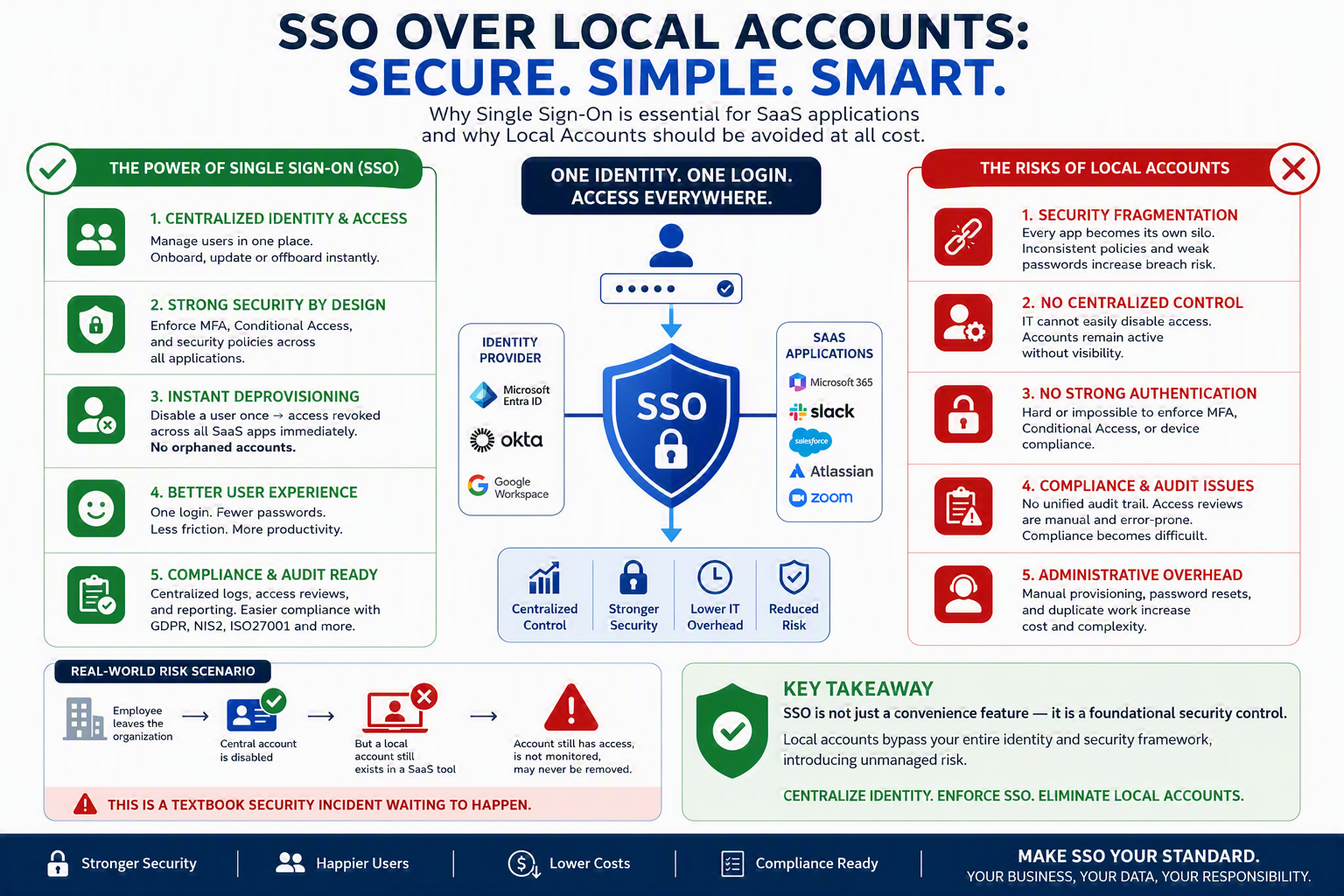
This article explains why.
What Is Single Sign-On (SSO)?
Single Sign-On (SSO) allows users to authenticate once (via a trusted Identity Provider like Microsoft Entra ID, Azure AD, Okta, etc.) and gain access to multiple applications without re-entering credentials.
Instead of each SaaS application managing its own users and passwords, all authentication is centralized.
The Problem with Local Accounts in SaaS Applications
Many SaaS tools still offer “local accounts” — usernames and passwords stored within the application itself.
At first glance, this seems harmless. In reality, it introduces significant risks:
1. Security Fragmentation
- Each SaaS app becomes its own identity silo
- No consistent security policies across applications
- Users often reuse weak passwords
Result: Higher risk of credential compromise
2. No Centralized Control
- IT cannot easily disable access when an employee leaves
- Accounts remain active without visibility
Result: Orphaned accounts = major security gap
3. No Strong Authentication Enforcement
- Difficult (or impossible) to enforce:
- Multi-Factor Authentication (MFA)
- Conditional Access
- Device compliance policies
Result: Weakened security posture
4. Compliance and Audit Issues
- No single audit trail across applications
- Access reviews become manual and unreliable
- GDPR / NIS2 / ISO compliance becomes harder to demonstrate
Result: Increased audit risk
5. Administrative Overhead
- Manual user provisioning and deprovisioning
- Password reset support burden
- Increased operational complexity
Result: Higher IT costs and inefficiency
Why SSO Is the Best Practice
Moving to SSO eliminates nearly all of the above risks and introduces strong governance capabilities.
1. Centralized Identity & Access Management
- All users are managed in one central directory
- Immediate onboarding and offboarding
- Role-based access control (RBAC)
One source of truth for identities
2. Strong Security by Design
SSO allows enforcement of:
- Multi-Factor Authentication (MFA)
- Conditional Access (based on location, device, risk)
- Identity Protection policies
Security becomes proactive, not reactive
3. Instant Deprovisioning (Critical!)
When an employee leaves:
- Disable user → access revoked across all SaaS apps instantly
No orphaned accounts
This alone is one of the strongest arguments against local accounts.
4. Improved User Experience
- One login for all applications
- Fewer passwords → fewer lockouts
- Faster access to tools
Productivity increases
5. Audit & Compliance Ready
- Central logging and reporting
- Easy access reviews
- Clear traceability of user actions
Essential for GDPR, NIS2, ISO27001
Why Local Accounts Should Be Avoided “At All Cost”
From a governance and security standpoint, local accounts bypass your entire identity and security framework.
They effectively:
- Ignore your MFA policies
- Circumvent Conditional Access
- Break your audit trail
- Introduce unmanaged risk
In modern environments, this is no longer acceptable, especially in:
- Government / public sector
- Financial services
- Healthcare
- Any NIS2-regulated organization
Real-World Risk Scenario
Consider this situation:
- Employee leaves the organization
- Their central account is disabled
- BUT… a local account still exists in a SaaS tool
That account:
- Still has access
- Is not monitored
- May never be removed
This is a textbook security incident waiting to happen
Best Practices for Businesses
To fully secure your SaaS landscape:
1. Enforce SSO Everywhere
- Make SSO mandatory for all SaaS apps
- Disable local login where possible
2. Block Local Account Creation
- Configure SaaS apps to rely only on identity provider login
- Remove password-based authentication inside apps
3. Integrate Provisioning (SCIM)
- Automate:
- User creation
- Role assignment
- Deletion
4. Perform Access Reviews
- Regularly validate who has access to which applications
5. Align with Security & Compliance Policies
- Ensure SSO integrates with:
- MFA
- Conditional Access
- Logging & monitoring systems
Conclusion
In a modern SaaS-driven organization, identity is the new security perimeter.
Organizations that continue to allow local accounts are:
- Increasing their attack surface
- Losing control over access
- Introducing compliance risks
The path forward is clear:
- Centralize identity
- Enforce SSO
- Eliminate local accounts